
- Many bloggers also do have a FB (Facebook) Fan Page. Ever noticed that long string of numbers in your URL? Mine looked like this before: https://www.facebook.com/pages/Mariettes-Back-to-Basics-LLC/344099510841
- Let me show you how I did change it to: facebook.com/MariettesBacktoBasics
- Yes, if you click on it or copy and paste this into your browser it takes you straight to my FB Page.
- That would be very helpful in mentioning into an email or wherever you want to publish this. Looks neat and will be easy to remember and does not look spammy.
- At first I noticed this short FB Fan Page URL in Avril's Royal Ribbon FB Fan Page: facebook.com/RoyalRibbons. We communicated via our LinkedIn accounts.
- So I had to figure it out and like to share it here with you.
- Log in to your regular FB account NOT your FB Fan Page!
- In the browser put: facebook.com/username ←click it if you already are logged in.

Click on drop down box next to Pages...

Select the name of your Page or else type in your Page's name
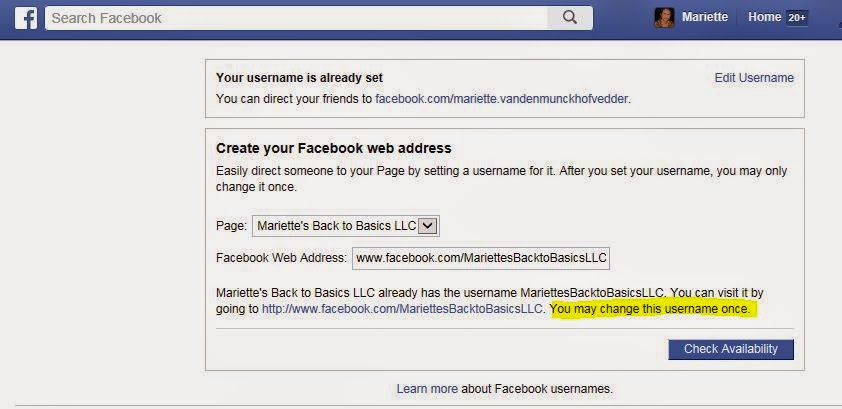
Be careful as your username may be changed only once!

Click Confirm
From my previous posting I had the info below:
- A 'Enter Desired Username' will popup on the right - see where MariettesBacktoBasicsLLC is typed inside.
- Now very careful type inside THAT box the name YOU want to show directly behind facebook.com
- DOUBLE check as it cannot be changed! Make sure you capitalize words as they will appear exactly like that in your new URL.
Good luck! Let me know if you managed to change your Fan Page.
Related link:
{YOUR Facebook Like Plugin for Blogger} | other post by me


grazie cara Mariette!!!!!!! come va? un abbraccio grandissimo Lory
ReplyDeleteLiebe Mariette,
ReplyDeleteein dankbarer Gruß von einer kranken Elisabeth
Hola Mariette, paso a saludarte y a desearte una buena semana. Muchas gracias por tu lindo comentario en mi blog. Besos.
ReplyDeleteThanks for this I like learning something new
ReplyDeleteDearest Mariette,
ReplyDeleteI think to remember what you told us.
Today is another hot weather in here I just stayed home.
Hugs to you and lots you always!
Michiko
Liebe Mariette,
ReplyDeletediese Url-Shortener gibts auch für Twitter. Aber ich bin bei beiden Portalen kaum aktiv, da mir einfach die Zeit dafür fehlt und ich es auch zu anstrengend finde, den ganzen Tag zu sitzen. Der bzw. die Blogs sind schon Aufwand genug.
Liebe Grüße nochmal
Sara